
Docs
How to Switch to Microsoft Defender Antivirus on Windows 11
Quick answer
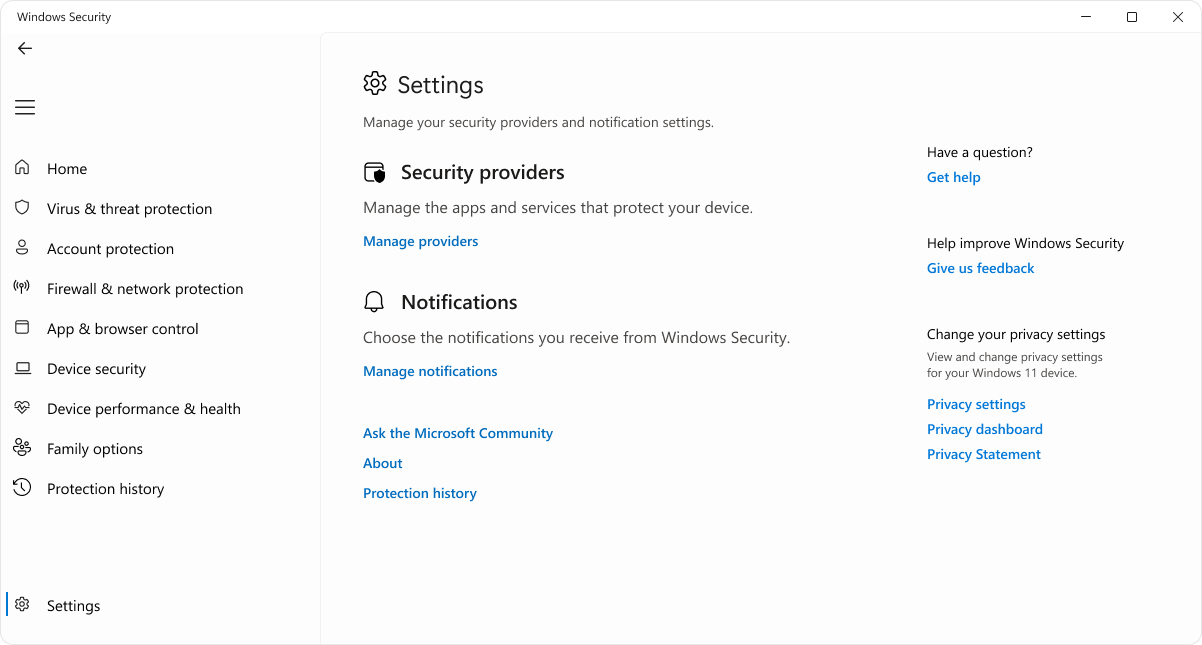
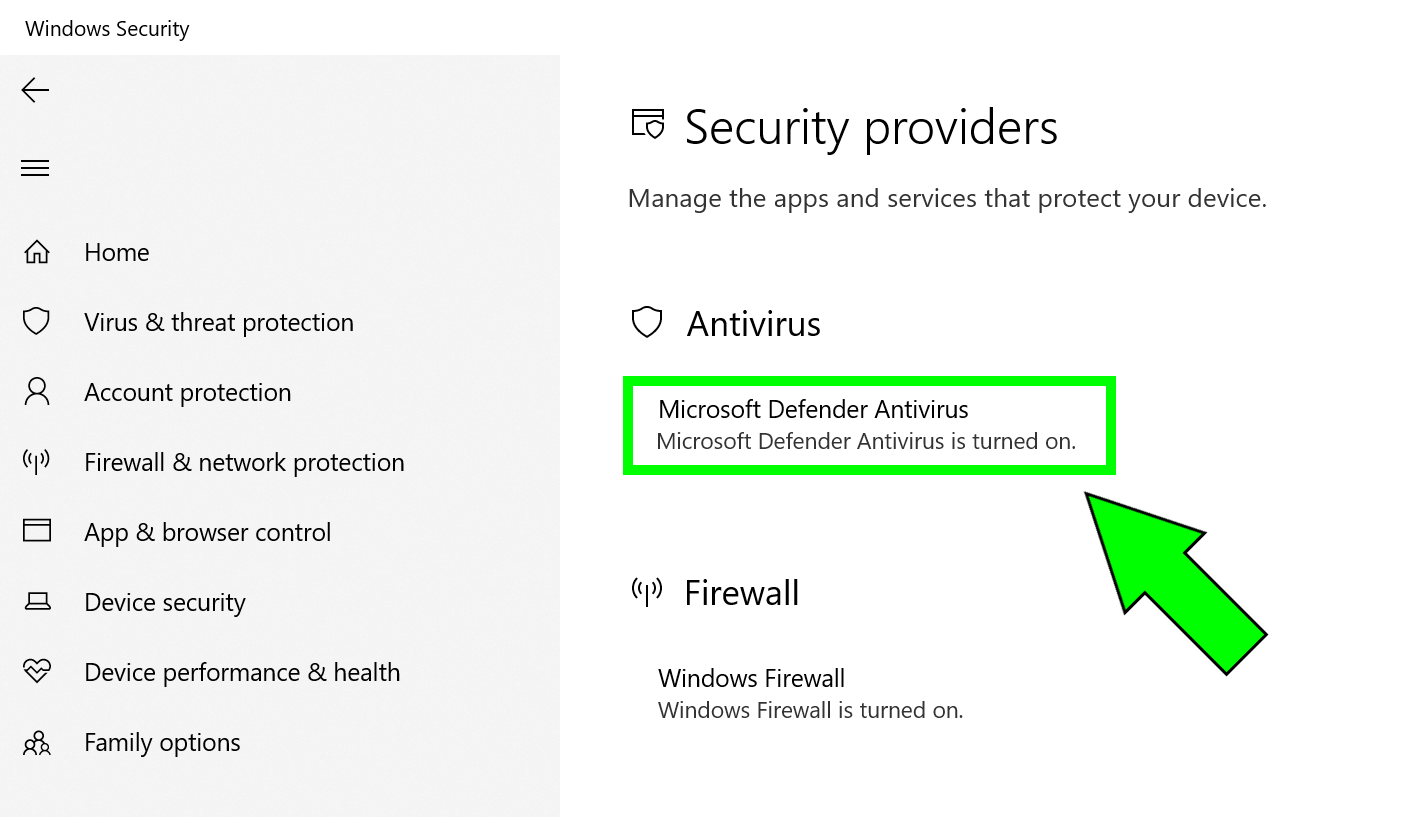
On Windows 11, open Settings > Apps > Installed apps, choose … > Uninstall next to your current antivirus, and restart after removal. If setup fails, use the antivirus vendor’s removal tool and restart again. In Windows Security > Settings > Manage providers > Antivirus, confirm Microsoft Defender Antivirus is turned on. Under Virus & threat protection > Manage settings, confirm Real-time protection is On. Microsoft’s provider check · Real-time protection settings
How-to for Windows 11 users and IT administrators
Windows 11 includes Microsoft Defender Antivirus. You can use it without a Microsoft Defender for Endpoint subscription. On a work or school PC, confirm the intended provider with IT before removal. Teams deploying the licensed endpoint service should follow Microsoft’s onboarding sequence. Defender Antivirus on Windows · Defender for Endpoint migration
Which antivirus are you removing?
| Current antivirus | Where to start |
|---|---|
| Norton 360 | Uninstall Norton 360 or use Remove only |
| McAfee LiveSafe or Total Protection | Remove a preinstalled McAfee trial |
| Avast Free Antivirus | Use Avast Setup or the Avast Uninstall Tool |
| AVG AntiVirus FREE | Use AVG Setup or the AVG Uninstall Tool |
| Managed Webroot / OpenText Core Endpoint Protection | Start in the OpenText console and verify each PC |
| Another personal antivirus | Open its menu in Installed apps and follow its publisher’s uninstall instructions. Windows uninstall options |
How do I verify that Defender took over after the restart?
- Open Start > Windows Security > Settings > Manage providers. Expand Antivirus and look for Microsoft Defender Antivirus is turned on. You can also reach this list from Virus & threat protection > Who’s protecting me? > Manage providers. Microsoft’s instructions for checking the active provider
- Open Windows Security > Virus & threat protection > Manage settings. Check that Real-time protection reads On. The provider name tells you which product Windows recognizes. This second check tells you whether Defender is scanning files as you use them. Microsoft’s real-time protection guide
- For a functional check, select Virus & threat protection > Protection updates > Check for updates, then return to Virus & threat protection > Quick scan. Record the result alongside the provider and real-time status. Microsoft’s scan and update options
What should Get-MpComputerStatus show?
For a standard Windows 11 PC using Microsoft Defender Antivirus as its primary antivirus, expect AMRunningMode to be Normal, AntivirusEnabled to be True, and RealTimeProtectionEnabled to be True. Run this read-only check in Windows PowerShell on the PC after restarting. Microsoft’s operating-mode definitions · Get-MpComputerStatus output
Get-MpComputerStatus | Select-Object AMRunningMode, AntivirusEnabled,
    RealTimeProtectionEnabled, AntivirusSignatureLastUpdated, QuickScanEndTime
AntivirusSignatureLastUpdated dates the installed security intelligence. QuickScanEndTime dates the last completed quick scan. Both can predate the switch. Use the mode and the two protection flags to decide whether the handoff succeeded.
What if the previous antivirus is still active?
Finish any pending restart and check Manage providers > Antivirus again. If the old product is still active, return to its vendor guide for the supported cleanup step. Windows can reactivate Defender automatically after the other antivirus is removed. Verify the result on the PC. Microsoft’s antivirus compatibility guidance
If settings are locked or PowerShell reports Passive or EDR Block Mode, record the mode and provider name and ask the administrator to compare them with the intended policy. Diagnose an unexpected provider · Check organization-managed settings
If the PC is offline or a remote status query fails, mark it Pending verification, keep the error and time, and repeat the check when reachable. A fresh result from that PC is the evidence needed to close the switch. Check Defender status on multiple computers
Screenshot sources
- Windows Security Settings — Microsoft Support. Used with permission from Microsoft.
- Microsoft Defender Antivirus turned on — UTEP IT